Scouting · Guide
Trail camera settings: what each one does, and a chart of what to set for each kind of set
Every menu has the same eight decisions under different names. Here's what each one changes in the photo and the battery, a settings chart by set type, and the cellular settings that decide your plan bill.
By Mike M.Updated Spec-checked · every figure sourced
#adReader-supported: we may earn a commission if you buy through our links, at no extra cost to you. It never decides a ranking. How we rank · Disclosure
The eight settings
- Mode: photo, video, photo+video, time-lapse. Photo is the battery-cheap default. Video costs roughly five times the battery (Trailcampro's estimate on one camera: 31 months photo, 5.7 video).
- Burst / multi-shot. Photos per trigger. Tactacam lists a three-photo burst on the X 3.0; Stealth Cam up to nine on the Deceptor Max 3.0. Two is the sweet spot on a trail; one at a feeder.
- Delay / interval. The rest period after a trigger. Thirty seconds to a minute on a trail; five to ten minutes at a feeder, where 10-second triggers on one doe fill a card and a plan.
- PIR sensitivity. High extends detection and multiplies false triggers on grass and sunlit branches; low cuts both. Medium in fall, low on windy edges and in summer heat, high in winter.
- Time-lapse interval. A photo every N minutes regardless of motion, usually in a daylight window. See below.
- Resolution. Stored resolution on the card; on cellular, the transmit resolution (Spypoint's plans send downsized photos; HD is a pack). Higher stored resolution fills a card faster; higher transmit resolution costs plan.
- Transmit schedule (cellular). Instant, hourly, or set times. Once or twice a day is the battery- and plan-friendly default.
- IR flash mode. Browning's "Power Save, Fast Motion, Long Range"; Spypoint and Tactacam Ultra switch between no-glow and low-glow. Fast Motion for blur, Long Range for reach, Power Save for a feeder at 15 feet.
Settings chart by set type
| Set | Mode | Burst | Delay | Sensitivity | Transmit | IR |
|---|---|---|---|---|---|---|
| Scrape / licking branch | Photo | 2 | 1 min | Medium | 1x/day | Long range or no-glow |
| Trail / pinch point | Photo | 2-3 | 30 s | Medium-high | 1-2x/day | Fast motion |
| Feeder / bait | Photo | 1 | 5-10 min | Low-medium | 1x/day | Power save |
| Field edge / plot | Photo + time-lapse (dawn/dusk) | 1 | 1 min | Medium | 1x/day | Long range |
| Water | Photo | 2 | 1 min | Medium | 1x/day | Long range |
| Bedding edge (cellular only) | Photo | 1 | 2 min | Medium | 1x/day | No-glow |
| Security / gate | Photo (or video on Browning DV) | 3 | 10 s | High | Instant | No-glow, fast motion |
| Target buck, known trail | Video 10-15 s | — | 30 s | Medium | Instant (HD on request) | Fast motion |
Starting points, not rules. Adjust from what the first two weeks show.
Photo vs video, honestly
Time-lapse: the underused mode
Time-lapse takes a photo every interval (say, every 5 minutes) during a window (say, the last two hours of light) whether or not anything triggers the PIR. On a field or plot, deer feed 80 yards out, well beyond any detection range; time-lapse is the only way to see them. Spypoint lists Time-Lapse and Time-Lapse+ modes; most brands have an equivalent. Set the window to dawn and dusk, the interval to 2 to 5 minutes, and expect a lot of empty frames and one that shows you where the buck enters.
Cellular settings that decide your bill
- Transmit resolution. Standard on every plan; HD on request. Leave it standard and request HD when the photo deserves it.
- Transmit schedule. Instant send at a busy feeder burns batteries and, on metered plans, photos. Once a day is enough for scouting; instant for security.
- AI filtering. Spypoint's Buck Tracker, Moultrie AI, Stealth Cam's false-image detection and PIR zone selection: all exist to stop sending photos of grass. Turn them on.
- Delay at feeders. The single biggest plan-photo saver. Ten minutes between triggers at a feeder still gives you every deer that visited.
The plan side of this is in plans compared; the battery side in battery life explained.
Three cameras with settings worth having
Our picks for this
PIR zones, AI video switching, adjustable trigger and IR
Three cameras whose menus give you more to work with than the average.
Best no-glow flash array
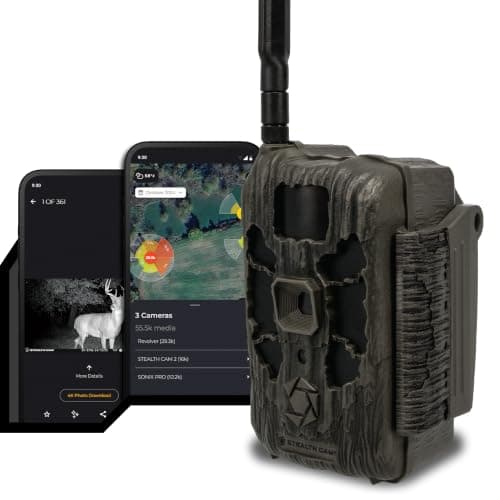
Stealth Cam Deceptor Max 3.0
Stealth Cam Command9.1/10PIR zone selection and false-image detection: draw the zone, skip the grass.
$110.05Amazon#ad · Price as of November 5, 2026 · Disclosure for the link to Stealth Cam Deceptor Max 3.0
Best detection cellular camera
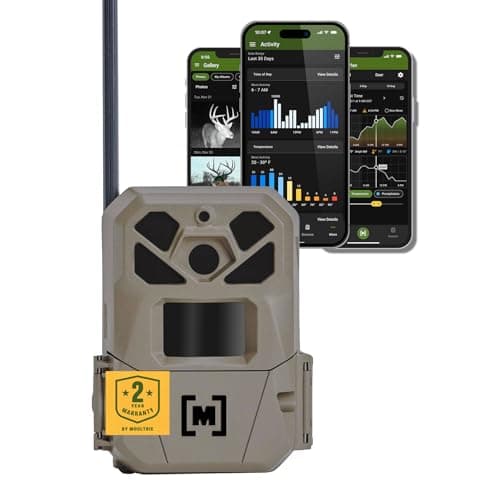
Moultrie Edge 3 Pro
Moultrie Mobile9.3/10Moultrie AI switches from photo to HD video when a buck is detected; on-demand included.
$98.99Amazon#ad · Price as of November 5, 2026 · Disclosure for the link to Moultrie Edge 3 Pro
Best premium no-glow SD camera
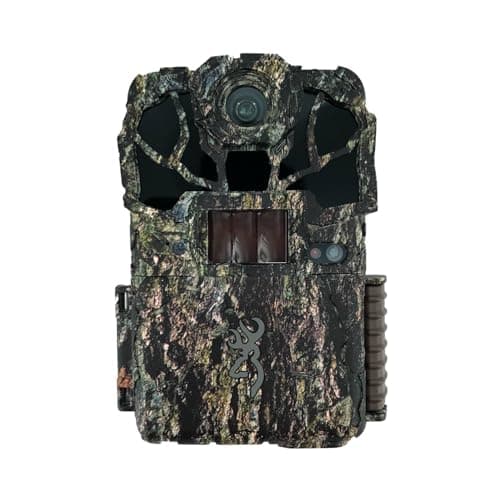
Browning Spec Ops Elite HP5 Ultra
SD / Wi-Fi9.4/10Adjustable 0.1-0.7 s trigger, adjustable detection up to 80 ft, three IR modes.
$154.93Amazon#ad · Price as of November 5, 2026 · Disclosure for the link to Browning Spec Ops Elite HP5 Ultra
Two settings deserve their own page. Delay, burst and sensitivity are the levers for a camera that fires on nothing, and the order to pull them is in trail camera false triggers. Time lapse behaves differently from everything else in this menu, because it ignores the motion sensor entirely — see trail camera time lapse mode.
Settings change through the year, and so does where the camera should be hanging. The month-by-month version — what to set and where to hang it from February sheds through late-season food — is in when to put out trail cameras.
How we scored this
The research behind these picks
Every pick here is built from documented evidence: the maker's published trigger speed, flash type, battery configuration and detection range; each brand's plan tiers verified on its own plan page and turned into the real monthly cost at one and four cameras; the independent shootouts (Trailcampro, Outdoor Life, Field & Stream, TechGearLab) cited by name for the measurements they published; and a public rubric applied the same way to every model. Every figure links to where it came from, so you can check our work in one click.
Scores are editorial judgments from that documented research. Commissions never set a score or decide a pick. The rubric and its weights are published.
Questions
Frequently asked
What are the best settings for a trail camera?
Photo mode, single shot or 2-shot burst, 30-second delay on trails and 5 minutes at feeders, medium sensitivity, standard-resolution transmission once or twice a day on cellular. Adjust after two weeks.
Should I set my trail camera to photo or video?
Photo for inventory and almost everything else; video for a specific animal on a known trail. Video costs about five times the battery (Trailcampro's 31 vs 5.7 month estimate) and, on cellular, metered plan credits.
What is time-lapse mode on a trail camera?
A photo every set interval during a window regardless of motion. Use it on fields and plots where deer feed beyond PIR range: dawn and dusk windows, 2 to 5 minute intervals.
What trigger delay should I use?
Thirty seconds to a minute on trails and scrapes; 5 to 10 minutes at feeders and bait; 10 seconds for security. Longer delays are the biggest battery and plan saver at busy sets.
Keep reading
Related on Cam & Canopy
- Best trail camera software and appsGet the timestamp right or the analysis is worthless.
- Battery life explainedWhat each setting costs.
- Cellular plans comparedWhat each setting costs in plan.
- How to set up a trail cameraFirst-hang settings.
- Trail camera placementSet types this chart refers to.
- Trigger speed explainedBurst and recovery.
- Easiest trail cameras to useCameras with fewer settings to get wrong.
Receipts
Sources
- Trailcampro — GardePro T5NG review, measured figures (checked 2026-09-21)
- Tactacam — REVEAL X 3.0 product page (checked 2026-09-21)
- Stealth Cam — Deceptor Max 3.0 product page (checked 2026-09-21)
- Stealth Cam — Command data plans page (checked 2026-10-01)
- Moultrie Mobile — plans page (checked 2026-09-21)
- Moultrie — EDGE 3 PRO product page (checked 2026-09-21)
- Spypoint — photo transmission plans (checked 2026-09-21)
- Spypoint — FLEX-DARK product page (checked 2026-09-21)
- Browning Trail Cameras — Strike Force Pro X 1080 product page (checked 2026-09-21)
- Browning Trail Cameras — Spec Ops Elite HP5 Ultra product page (checked 2026-09-21)
- Browning Trail Cameras — Defender Pro Scout Max HD DV product page (checked 2026-09-21)
Every number above is traceable: specs come from the maker's own product pages (linked on every product), plan prices from the maker's plan page with an “as of” date, and independent measurements are attributed to whoever made them. Amazon prices change often, so every buy button takes you to Amazon's current price for that listing. Read the full method.